![content.buywithvan.comhs-fshubfsvan-logo-white-1.png]](https://knowledge.buywithvan.com/hs-fs/hubfs/social-suggested-images/content.buywithvan.comhs-fshubfsvan-logo-white-1.png?width=120&height=48&name=content.buywithvan.comhs-fshubfsvan-logo-white-1.png)
In this section of the VDP Key Features, you will find all relevant information after the vehicle was acquired and subsequently resold, either to a final owner (Retailed) or to a wholesale dealership (Wholesaled).
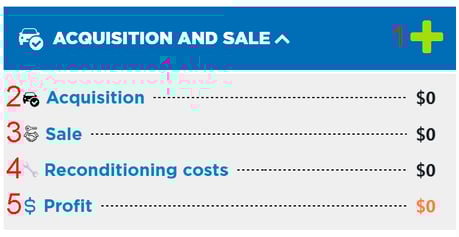
This section shows:
- Add - By clicking in the ➕ icon, you can add to the listing:
- Acquisition Price - This option allows you to enter the price paid to acquire the vehicle, and allows you to make another changes to the listing as shown in the image below:
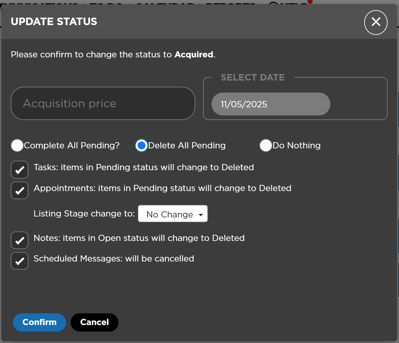
- Retailed Price - This option is disabled until the Acquisition Price of the vehicle is completed. Here you set the price the vehicle was sold to a final owner, charge the Reconditioning costs (if any)
- Wholesaled Price - This option is disabled until the the Acquisition Price of the vehicle is complete. Here you set the price the vehicle was sold to a wholesale dealer, and update some of the listing sections (Image above). Once confirmed, this listing status will change to Wholesaled
- In regards to the Pending Actions, you will see the following options to batch update them.
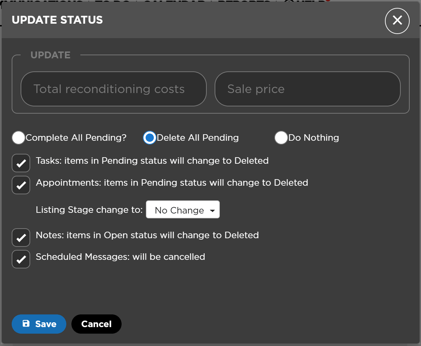
- Once confirmed, this listing status will change to Retailed
- Acquisition Price - This option allows you to enter the price paid to acquire the vehicle, and allows you to make another changes to the listing as shown in the image below:
- Acquisition - Shows the Acquisition Price
- Sale - Shows the Retailed or Wholesaled price, depending of who was the vehicle sold to
- Reconditioning costs - Shows the amount spent in the vehicle prior to its sale
- Profit = Sale$ - Acquisition $ - Reconditioning costs
Updating the acquisition information
To update the acquisition information, in regards to the date or price / value, follow these steps:
- Update the listing stage back to Appraised: An appraised value will be required
- Update the listing stage back to Acquired: Here you will be able to change the acquisition price and acquisition date
- Confirm the changes