![content.buywithvan.comhs-fshubfsvan-logo-white-1.png]](https://knowledge.buywithvan.com/hs-fs/hubfs/social-suggested-images/content.buywithvan.comhs-fshubfsvan-logo-white-1.png?width=120&height=48&name=content.buywithvan.comhs-fshubfsvan-logo-white-1.png)
This feature is included in Professional and Accelerated tiers. Standard accounts do not have communication. Compare plans here
Making a call:
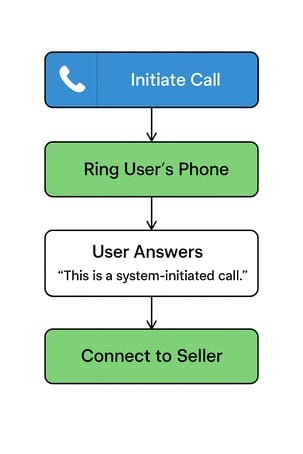
- Click the blue 📞 button on the VDP.
- Once call is selected, user's set ring to number, whether it be a desk line or a cell phone, should start to ring.
- When the user pick up the call, it will have a recorded message indicating that it is the system call, and then it will proceed to ring to the seller's provided phone number.
- Once the call is finished, the user may hang up as normal.
It's important to note that incoming calls are recorded, but outgoing calls are not recorded for legal purposes. In the communication history, users will be able to see the calls and their duration, but won't be able to listen back on it unless it is an incoming call.