![content.buywithvan.comhs-fshubfsvan-logo-white-1.png]](https://knowledge.buywithvan.com/hs-fs/hubfs/social-suggested-images/content.buywithvan.comhs-fshubfsvan-logo-white-1.png?width=120&height=48&name=content.buywithvan.comhs-fshubfsvan-logo-white-1.png)
If you synced a conversation from a marketplace, but the Communication History shows incorrect information, follow these steps:👇🏽
- Open the listing inside the VAN Chrome Extension
- Click in the down arrow, at the far right to expand the listing's sub-menu
- Click Report Issue
- Add as much info and context as possible
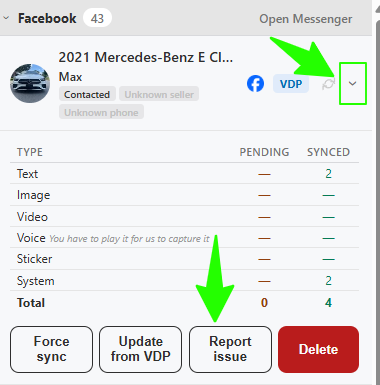
The support ticket will be created with metadata allowing faster troubleshooting.
While following these steps, the support ticket will be created with metadata that allow us to troubleshoot the issue faster
Force sync
Alternatively, select "Force Sync" to attempt a fresh sync that resolves most common syncing issues.
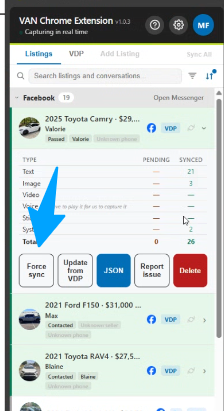
If the messages sync issue persist
- Select Delete
- Open the conversation in the marketplace again and then, reload the page
- Wait for the Extension to identify it again and show inside the Conversations tab
- Click Force Sync
If you don't want a conversation synced at all
Open the listing's sub-menu and select Skip. The conversation moves to the Skipped status and will not sync again, even with auto-sync on. You can un-skip it from the same menu.