![content.buywithvan.comhs-fshubfsvan-logo-white-1.png]](https://knowledge.buywithvan.com/hs-fs/hubfs/social-suggested-images/content.buywithvan.comhs-fshubfsvan-logo-white-1.png?width=120&height=48&name=content.buywithvan.comhs-fshubfsvan-logo-white-1.png)
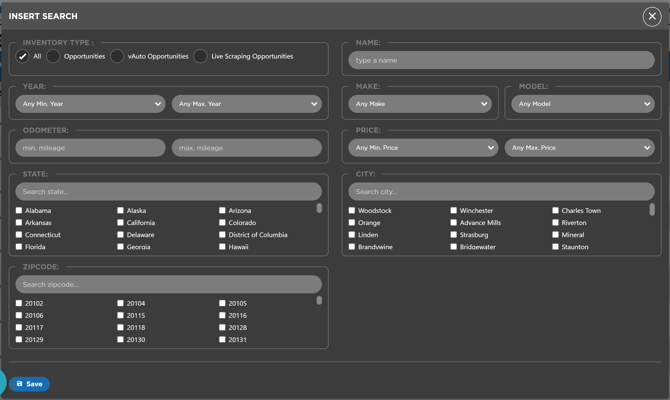
While all the inventory searches criteria is cover in the Inventory Searches article, here we'll list al the fields a manual search can be filtered by:
- Name - Search Name
- Year Range - Minimum/Maximum year values. If any of the range fields is left empty, the filter will be comprehended through the whole range of the main account search
- Make - Use it if search for a specific make
- Model - Use it if search for a specific model
- Odometer Range - Minimum/Maximum odometer values. If any of the range fields is left empty, the filter will be comprehended through the whole range of the main account search
- Price Range - Minimum/Maximum price values. If any of the range fields is left empty, the filter will be comprehended through the whole range of the main account search
- State / City / Zipcode - This fields allows to select multiple options (or all of them) from the ones available in the account settings