![content.buywithvan.comhs-fshubfsvan-logo-white-1.png]](https://knowledge.buywithvan.com/hs-fs/hubfs/social-suggested-images/content.buywithvan.comhs-fshubfsvan-logo-white-1.png?width=120&height=48&name=content.buywithvan.comhs-fshubfsvan-logo-white-1.png)
- Open dealer.buywithvan.com in your mobile browser
- For Android and Chrome
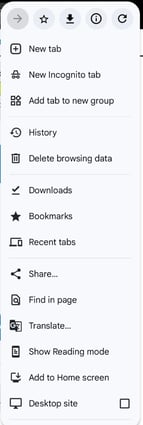
- Open the browser menu
- Look for the option "Add to Home Screen"
- Install VAN Dealer App and wait
- Create a shortcut in your home screen
-png.png?width=220&height=428&name=image%20(1)-png.png)
-png.png?width=191&height=424&name=image%20(2)-png.png)
- For iOS and Chrome
- same as above
- For iOS and Safari
- Tap the Share button (the square with an upward arrow)
- Scroll down and select " Add to Home Screen"
- Name the shortcut and tap Add
Our mobile App is a web responsive app. That is why you will not find it in Androids or iOS stores