![content.buywithvan.comhs-fshubfsvan-logo-white-1.png]](https://knowledge.buywithvan.com/hs-fs/hubfs/social-suggested-images/content.buywithvan.comhs-fshubfsvan-logo-white-1.png?width=120&height=48&name=content.buywithvan.comhs-fshubfsvan-logo-white-1.png)
Unveiling Unlimited Listings in the SRP
Improved Loading Speeds
When it comes to acquiring private vehicles, having speed on your side gives you a clear competitive edge. Our latest updates have been designed to enhance loading times, allowing you to seize opportunities and optimize your strategies quickly.
What We've Done
Our development team has optimized the search pages, ensuring faster loading times across the board. This isn't just a minor tweak; it's a significant improvement designed to make your VAN experience as smooth as possible.
How You Benefit
What does this mean for you? Less time waiting and more time doing. Whether browsing listings or managing your inventory, you can expect a noticeably faster and more efficient experience.
Distance Metrics
Understanding the distance between private party listings and dealerships can be a crucial factor in decision-making. Whether it's for logistics planning or simply gauging the convenience of a location, distance metrics provide valuable insights.
How It Works
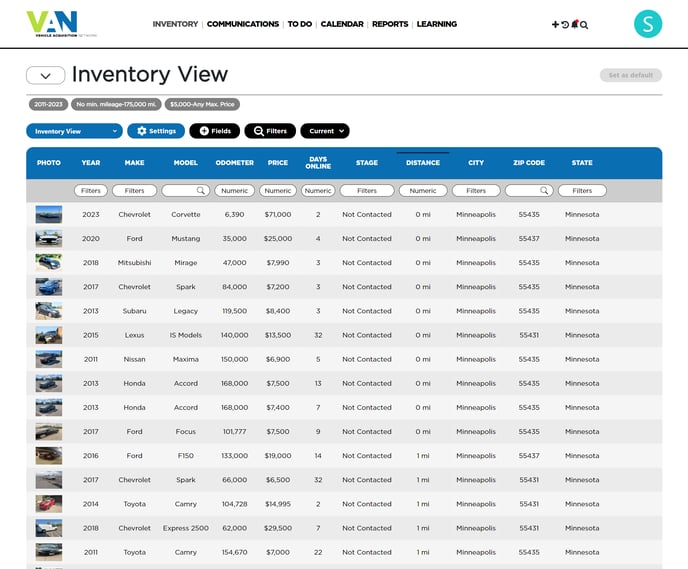
We've introduced a new feature that showcases the aerial distance between individual listings and dealership locations directly on the Search Results Page. Now, the SRP will display the straight-line distance to a dealer's location for most of the available listings.
Practical Applications
This new feature can assist in various scenarios—such as evaluating which listings are most conveniently located for potential visits or gauging the distance for logistical planning.
Assigned User Feature
Keeping track of who is responsible for each listing can optimize operations and bolster accountability within your team. Knowing who did what can be incredibly beneficial for managing tasks and performance.
Introducing the New Assigned User Feature
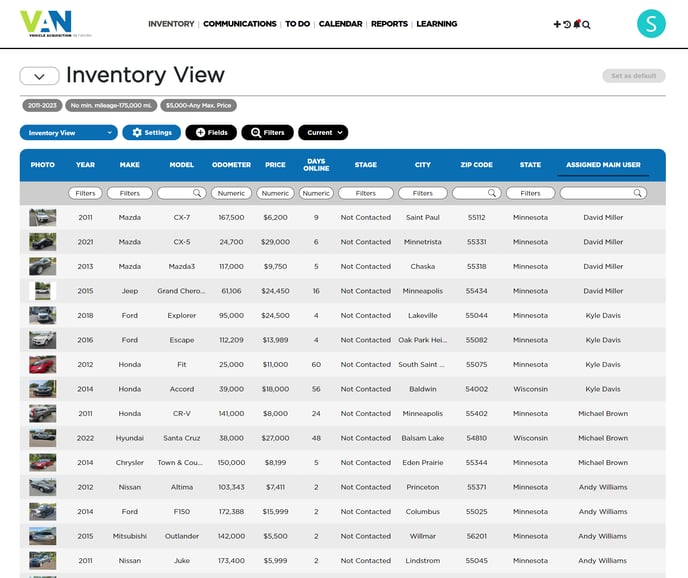
Our Assigned User feature allows you to track the responsible users for each listing based on their interactions. No more guessing or backtracking to find out who updated a listing; it's all at your fingertips.
How to Use It
The Assigned User feature is designed to be intuitive. Go to the VDP to assign a user if Engage hasn't already assigned one based on the first user interaction with the listing.