![content.buywithvan.comhs-fshubfsvan-logo-white-1.png]](https://knowledge.buywithvan.com/hs-fs/hubfs/social-suggested-images/content.buywithvan.comhs-fshubfsvan-logo-white-1.png?width=120&height=48&name=content.buywithvan.comhs-fshubfsvan-logo-white-1.png)
This feature, located in the Integrations menu of the VDP's quick actions section, allows you to download all the vehicle pictures shown in the carousel of the current listing for you to add them in the system you are pushing the listing information to.
In order to use it, click the integration button and select the Export Pictures option.
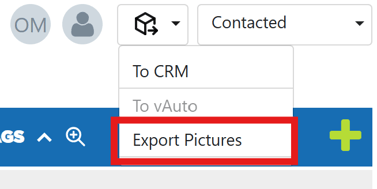
Once you do it, the pictures will be compressed on a zip file and downloaded in your device.