![content.buywithvan.comhs-fshubfsvan-logo-white-1.png]](https://knowledge.buywithvan.com/hs-fs/hubfs/social-suggested-images/content.buywithvan.comhs-fshubfsvan-logo-white-1.png?width=120&height=48&name=content.buywithvan.comhs-fshubfsvan-logo-white-1.png)
The Export menu, located on the top-right corner of each module that contains it, allows to extract information from the current view of the module you are on. Its behavior change according to the module as we will describe below.
Exports for Inventory
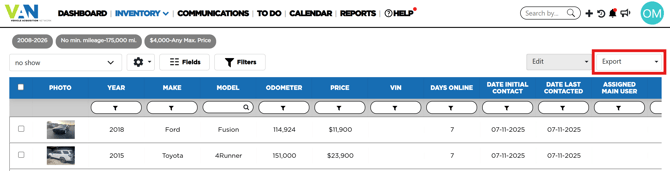
The export options available for this module are:
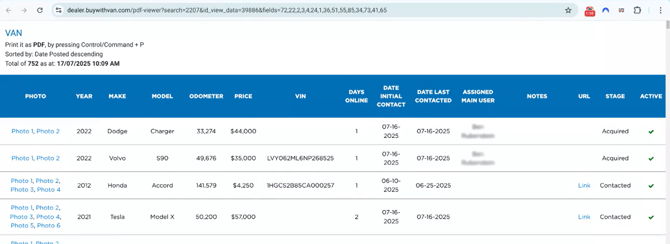
- to PDF (current fields) - This option will open a new browser tab and create a report with all the records of the current view and the fields that are visible at the moment. Users can print this report as a PDF file. This kind of reports looks like this:
- You can learn more about the views and fields here.
- to CSV (current fields) - This option will download a CSV file with a report of all the records from the current view and the fields that are visible at the moment. This kind of reports looks like this:
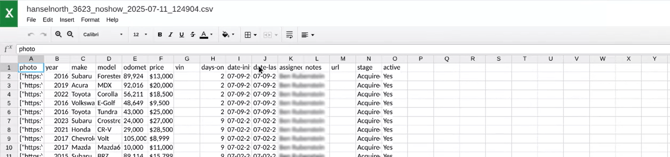
- to CSV (all fields) - this works the same way as the previous option, with the difference that it shows all the fields available, not only the ones visible at the time of the export
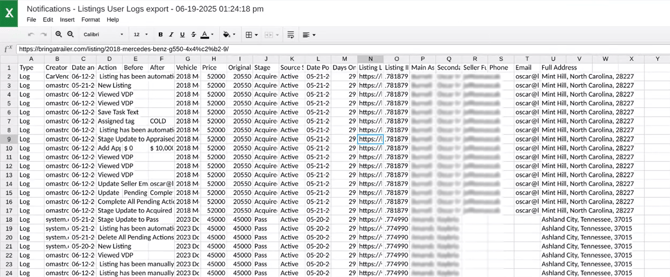
- to CSV (logs) - This option also download a CSV file with a report, but the information shown are the logs of all the listings contained in the current view. This file looks like this:
- If you want to know more about the listing logs, click here
Exports for Communications, To Do, Acquisitions, Calendar and Notifications
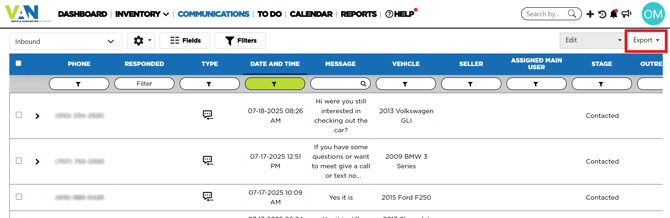
The export options available for these modules are:
- to CSV - This option will download a CSV file with a report of all the records from the current view and all the available the fields, not only the ones visible at the time of the export. This file will have the same structure as the CSV (all fields) option of the inventory module
- to CSV (Logs) - This option also download a CSV file with a report, but the information shown are the logs of all the listings contained in the current view. This file looks the same as the as the inventory module.
- If you want to know more about the listing logs, click here