![content.buywithvan.comhs-fshubfsvan-logo-white-1.png]](https://knowledge.buywithvan.com/hs-fs/hubfs/social-suggested-images/content.buywithvan.comhs-fshubfsvan-logo-white-1.png?width=120&height=48&name=content.buywithvan.comhs-fshubfsvan-logo-white-1.png)

If the user suspects that a seller is a dealership, they can flag them by clicking in the ⋮ icon of the Seller Information section (1) and then click in the 🏴Report as Dealership option. This will open the following window: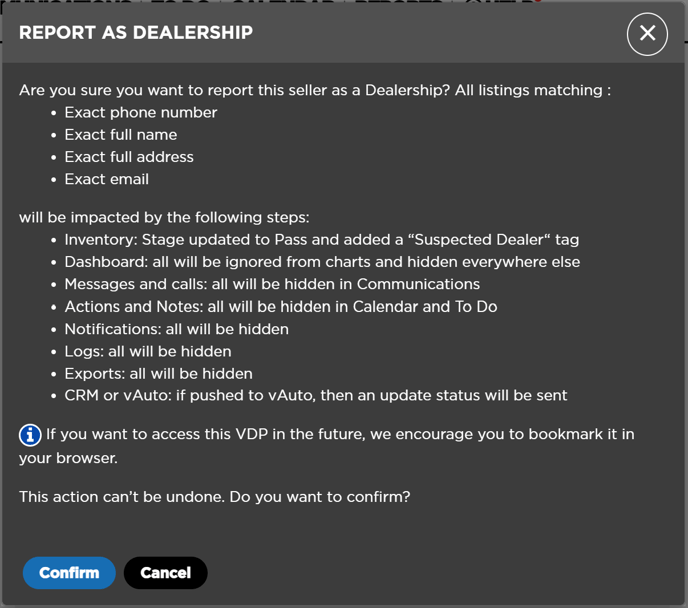
By clicking on the Confirm button of this window, the following changes will be made (besides those expained in the picture above):
- The VDP where you report the seller will be hidden and it won't be accessible again. Its stage will change to Pass
If, for any reason, you want to be able to access this VDP in the future, the only way to do it is by bookmarking it in your browser the listing before reporting it.
- The system will search and hide all the VDPs that share the same information with the one reported in the reported VDP's following fields:
- Phone Number
- Address
- Full Name - In this case, the system matches the fields First Name and Last Name as a whole. If both fields match the ones on the reported VDP, this VDP will be hidden too
If any of the previously mentioned fields is empty, the system will look for all the VDPs that match the available information.
- Filters will be added in the Settings ↗️ section of the Inventory module using the reported seller available information in order to avoid showing this dealership next publications. You can see an example of a phone number filtered below:
