![content.buywithvan.comhs-fshubfsvan-logo-white-1.png]](https://knowledge.buywithvan.com/hs-fs/hubfs/social-suggested-images/content.buywithvan.comhs-fshubfsvan-logo-white-1.png?width=120&height=48&name=content.buywithvan.comhs-fshubfsvan-logo-white-1.png)
This push is done from the Integrations menu located in the VDP. Everything from the vehicle information, listing information, and seller information shown in the VDP will carry over, but pictures will not.
- Pictures can not be exported to the CRM (click here for more details), however, you can export all the pictures following these steps, and then uploading them in your CRM.
- You can know more about CRM integration behavior and its setup, here.
Information pushed
- Vehicle Information
- Year
- Make
- Model
- Series
- VIN Number
- Engine
- Body Type
- Transmission
- Odometer
- Interior Color
- Exterior Color
- Price
- Seller Information
- First Name
- Last Name
- Phone
- Address
- Postal Code
- Listing Information
- Description
- Original Listing Link
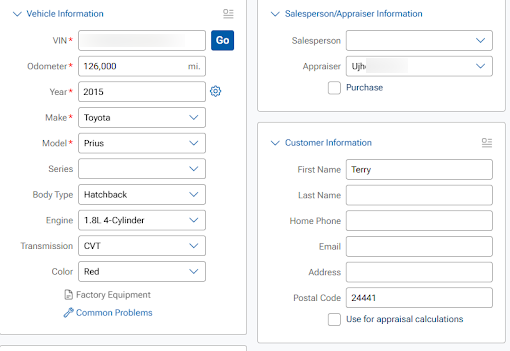
Inside vAuto, it will look like this
Troubleshooting
Sometimes the Push to vAuto may fail.
Make sure the VIN number and Zip / Postal code are valid.
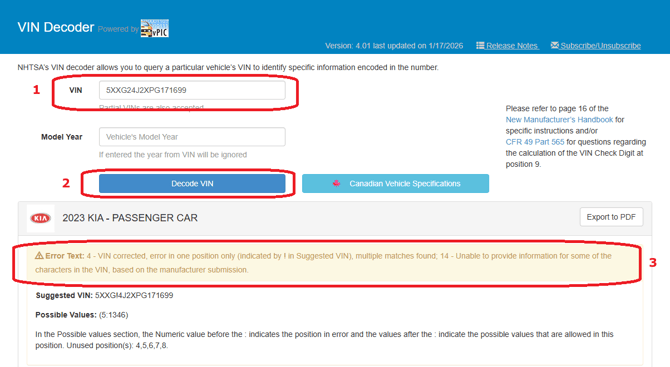
> Check the VIN here.
If it returns an error it means that the VIN is invalid: