![content.buywithvan.comhs-fshubfsvan-logo-white-1.png]](https://knowledge.buywithvan.com/hs-fs/hubfs/social-suggested-images/content.buywithvan.comhs-fshubfsvan-logo-white-1.png?width=120&height=48&name=content.buywithvan.comhs-fshubfsvan-logo-white-1.png)
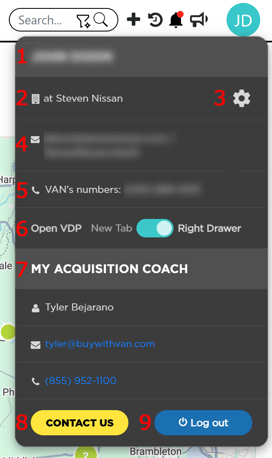
The user menu, located in the top-right corner of the platform, inside your user avatar, has the user account information as well as some settings described below:
- User's Name
- Account Name
- Account Settings - From this cog you can access to the Inventory Settings - Searches section
- User's Email/User ID
- User's VAN Phone Number
- Open VDP - This toggle sets the behavior of the platform for when you open a VDP, by opening it on a new browser tab or in a drawer inside the current active browser tab. If you want to learn more about the VDP drawers, click here
- Acquisition Coach information
- Contact Us Button - Open a windows to send a direct message to our team
- Log Out Button