![content.buywithvan.comhs-fshubfsvan-logo-white-1.png]](https://knowledge.buywithvan.com/hs-fs/hubfs/social-suggested-images/content.buywithvan.comhs-fshubfsvan-logo-white-1.png?width=120&height=48&name=content.buywithvan.comhs-fshubfsvan-logo-white-1.png)
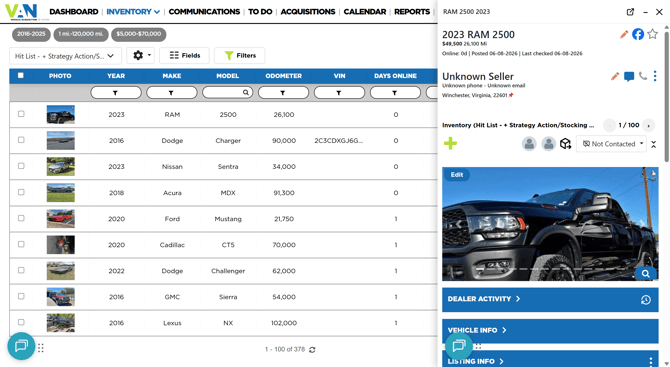
The VDP drawer is another way to visualize the VDPs in the VAN platform, by open them in boxes (drawers) inside the active browser tab instead of open them in a new tab.
These boxes can be minimized, closed or open the VDP in a new tab from their top section icons (1).
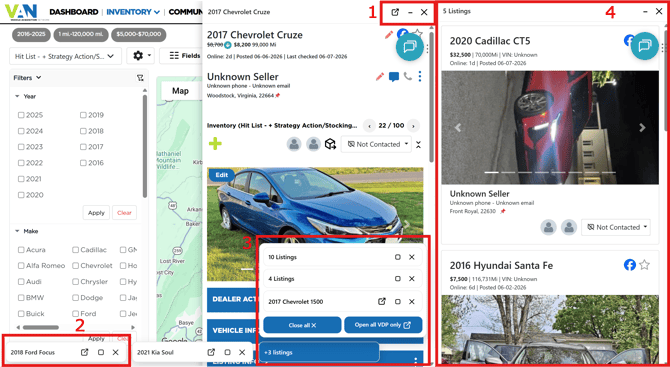
When minimized, they appear at the bottom of the tab (2) and when they surpass a number of minimized tabs, they'll start to group themselves (3). When using the Map Layout in the inventory module, the VDP drawer can also have groups of listing inside (4). If you want to learn about the different inventory layouts, click here.
This feature can be enabled/disabled from the User menu.