![content.buywithvan.comhs-fshubfsvan-logo-white-1.png]](https://knowledge.buywithvan.com/hs-fs/hubfs/social-suggested-images/content.buywithvan.comhs-fshubfsvan-logo-white-1.png?width=120&height=48&name=content.buywithvan.comhs-fshubfsvan-logo-white-1.png)
If you want to manually add a new listing into the platform, you can do it by clicking on the ➕ icon located near the top-right corner of the platform. You can see it marked in red on the image below.
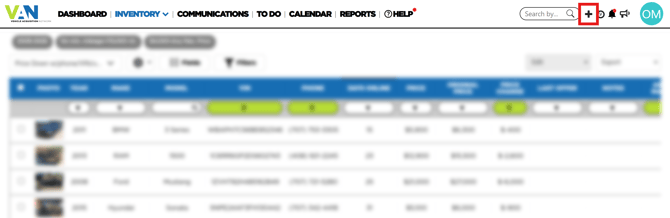
Once clicked, the Add Listing modal window will appear:
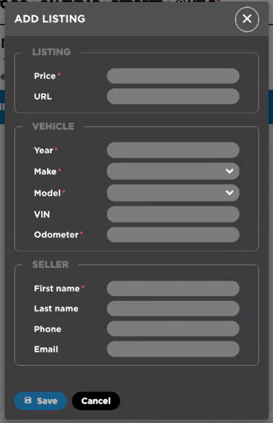
The fields requested for the creation of a new listing are divided in three categories:
- Listing
- Price* - The vehicle price
- URL - The URL of the original listing
- Vehicle
- Year*
- Make*
- Model*
- VIN
- Odometer*
- Seller
- First Name*
- Last Name
- Phone
* These fields are mandatory.
Validations upon creation
Consider while adding a new listing that the information logged should be within the parameters define in your inventory default search criteria, otherwise, you will be able to create the listing, but they will only be accessible through the quick search.
Once the Save button is clicked, the system will search in your inventory for listings thay may match the following fields:
- same Listing URL
- same Vehicle VIN number.