![content.buywithvan.comhs-fshubfsvan-logo-white-1.png]](https://knowledge.buywithvan.com/hs-fs/hubfs/social-suggested-images/content.buywithvan.comhs-fshubfsvan-logo-white-1.png?width=120&height=48&name=content.buywithvan.comhs-fshubfsvan-logo-white-1.png)
Within the quick actions Add menu located on the top-right corner of the VDP, the option to add an external communication can be found.
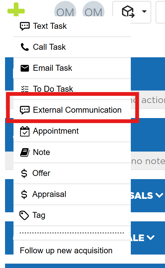
Sometimes users communicate with sellers from outside the platform. In those cases, this feature allow users to log those external communications in the VDP's communication history section.
Once opened the Add External Communication window, you'll find the following elements:
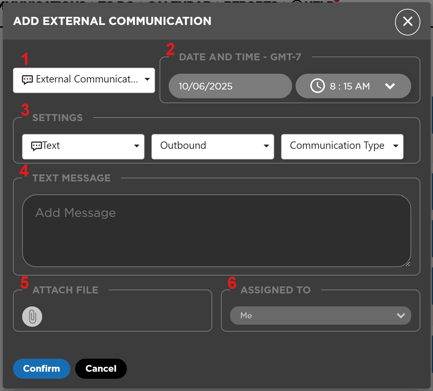
- The Add Dropdown - Here you will select what type of element will be added to the VDP. When you open the window, External Communication is selected by default.
- Date & Time Selection Section - The date and time when the external communication took place can be selected here.
- Settings Section - In this section, made by three dropdown menus, you will be able to select:
- Communication Channel - Selects which channel was used in the communication. The channel can be:
- Text
- Call
- Through the listing source (Facebook, Craigslist, etc.)
- Communication Direction - Indicates if the communication was:
- Outbound - From the user to the seller
- Inbound - From the seller to the user
- Communication Type - Here it is indicated which type of communication is being added:
- Initial - First communication between user and seller
- Follow-Up - A follow-up contact
- Non-Responder - A non-responder contact
- Reply - Any other kind of communication that is none of the previously described
- Communication Channel - Selects which channel was used in the communication. The channel can be:
- Text Message Section - In here you will find the text box to add the content of the message, or a description of the communication and its duration in case of a call
- Attach File Section - Here you will be able to attach an audio file for a call, or an image or pdf file for any other type of external communication. If you want to know more about attachments, click here
- Assigned To Section - External Communication are always assigned to the user who log them. This section is merely a reminder of this fact