![content.buywithvan.comhs-fshubfsvan-logo-white-1.png]](https://knowledge.buywithvan.com/hs-fs/hubfs/social-suggested-images/content.buywithvan.comhs-fshubfsvan-logo-white-1.png?width=120&height=48&name=content.buywithvan.comhs-fshubfsvan-logo-white-1.png)
This feature is included in Professional and Accelerated tiers. Standard accounts do not have integrations support. Compare plans here
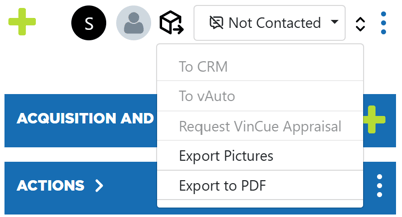
Through the VDP Export Menu, located on the top-right corner of the VDP, users are able to push specific listings over to:
- Request vAuto - Appraisal - Learn how it works here. Setup guide here
- Dealer's CRM - Learn how it works here. Setup guide here
- Request VinCue Appraisal - Learn how it works here.
Export Pictures
As integrations do not push the listings images, we added this option to the Integrations Menu. If you want to know how it works, click here
Export to PDF
When selected, this option generates a printable version of the VDP for the user to save as a PDF file or to print